Friday, 22 March 2013

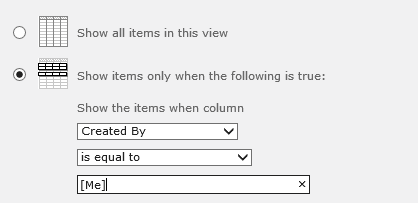
How to restrict the user only see list items created by him/her

This can be achieved in a couple of ways including coding an eventreceiver listening on ItemAdding or a workflow when items are added.

However the easiest would probably be to modify the default view and add the following filter:


The users should not have permissions to change the view though!

Wednesday, 27 February 2013

Error - All items returned by SPQuery

When you form your caml to be used with an SPQuery remember not to include the <Query></Query> tag. Begin with the <Where> tag.

Correct - The following will only return the item with the title "Listitem One":
  • <Where><Eq><FieldRef Name='Title' /><Value Type='Text'>Listitem One</Value></Eq></Where>
Wrong - The following will be some weird reason return all list items:
  • <Query><Where><Eq><FieldRef Name='Title' /><Value Type='Text'>Listitem One</Value></Eq></Where></Query>

Tuesday, 26 February 2013

Create a cross site lookup field without code

Out of the box you cannot create a cross site lookup field in SharePoint. You must create a new field type (code) to do this.
However the other day I came across a easy workaround where you don't have to code anything:

  1. Create your lookup list on the parent site
  2. On the parent site create a lookup site column that looks into the list created in step one.
  3. On the subsite create a list that should use the information stored in the list on the parent site.
  4. Add an existing column to the list (the column created in step two).

See also: Creating a cross site lookup field without code


Tuesday, 19 February 2013

Error occurred in deployment step 'Activate Features': The parent content type specified by content type identifier 0x010100C568DB52D9D0A14D9B2FDCC96666E9F2007948130EC3DB064584E219954237AF3900242457EFB8B24247815D688C526CD44D does not exist.


  • Solution: Activate the publishing features.

In this case you probably have a pagelayout that inherits from the "Article Page" content type (which is a part of the publishing pages).

Wednesday, 13 February 2013

Getting the full url in the code behind of a SharePoint page in the layouts folder

The issue

I had a situation where I had created a sub site collection and a deployed a asmx websercice to a subfolder in the layouts folder.
From codebehind I used HttpContext.Current.Request.Url to get the url of the web service.

If I in the browser entered the address:
  • http://server/sites/subsitecol/_layouts/webservice.asmx
I got the url
  • http://server/_layouts/myfolder/webservice.asmx
in the codebehind. Notice it has omited the path to the sub site collection.

My workaround

The RawUrl contains the path to the sub site collection. However it is server relative, so I build the absolute url like this (there might be better ways to construct the absolute url):

var uri = new UriBuilder(HttpContext.Current.Request.Url);
uri.Path = HttpContext.Current.Request.RawUrl;
var absoluteurl = uri.Uri.AbsoluteUri;